Quantum Gateway
Quantum Gateway is a feature-enriched, easy to use payment processing tool. Learn more about Quantum Gateway on their website at http://www.quantumgateway.com/.
Credit Card Processing Features
| Local Storage | Token Storage | Process | Refund | Void |
|---|---|---|---|---|
| YES | NO | YES | YES | YES |
ACH Processing Features
| Local Storage | Token Storage | Process | Refund | Void |
|---|---|---|---|---|
| YES | NO | YES | NO | YES |
Installing Quantum Gateway
To install the Quantum Gateway payment gateway, visit [Settings] > [Company] > [Payment Gateways] > Available, and click the "Install" button for Quantum Gateway.

A message will be displayed, indicating that the payment gateway was successfully installed.
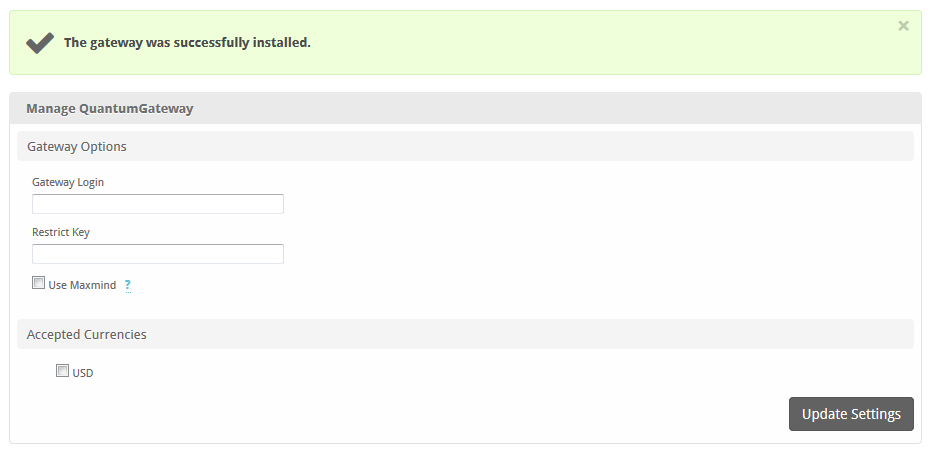
Enter the details provided by Quantum Gateway.
| Field Name | Description |
|---|---|
| Gateway Login | Enter the Gateway Login provided by Quantum Gateway or your merchant account provider. |
| Restrict Key | Enter the Restrict Key provided by Quantum Gateway or your merchant account provider. |
| Use Maxmind | Check to have Quantum Gateway run transactions through their Maxmind service. Additional charges may apply. |
| Accepted Currencies | Check the currencies that you would like to be processed through this payment gateway.The following currencies are available:USD |
When finished, click "Update Settings" to save the details. You have successfully installed and configured Quantum Gateway!