CCAvenue
CCAvenue is an innovative and advanced payment gateway. Learn more about CCAvenue on their website at https://www.ccavenue.com/.
Information
We recommend ensuring that mcrypt is enabled (libmcrypt PHP extension) to support data encryption for this payment gateway.
Installing CCAvenue
To install the CCAvenue payment gateway, visit [Settings] > [Company] > [Payment Gateways] > Available, and click the "Install" button for CCAvenue.

A message will be displayed, indicating that the payment gateway was successfully installed.
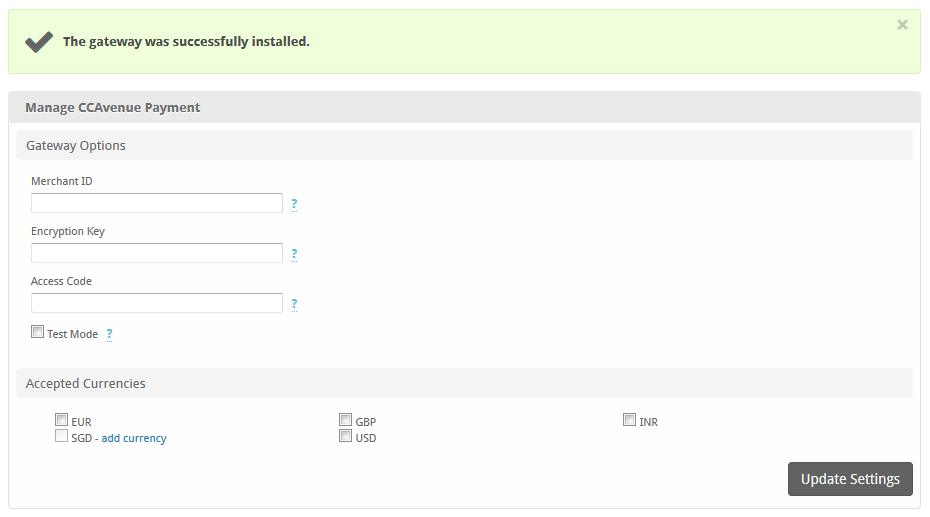
Enter the details provided by CCAvenue.
| Field Name | Description |
|---|---|
| Merchant ID | Enter your merchant User ID. |
| Encryption Key | The key used to encrypt data sent to the gateway. This is generated in your CCAvenue account under API Keys. |
| Access Code | The API access code. This can be found in your CCAvenue account under API Keys. |
| Accepted Currencies | Check the currencies that you would like to be processed through this payment gateway.The following currencies are available:EUR, GBP, INR, SGD, USD |
When finished, click "Update Settings" to save the details. You have successfully installed and configured CCAvenue!
Common Problems
- The gateway doesn't load properly when making a payment, or I receive Error Code: 10001
- Solution: Make sure PHP mcrypt is enabled, it's required by the gateway