Import Manager
The Import Manager imports data from other systems as part of a migration to Blesta.
Installing Import Manager
- Visit [Settings] > [Company] > [Plugins] > Available.
- Click the "Install" button within the Import Manager plugin listing.

Performing an Import
To perform an import, click the "Manage" button for the Import Manager plugin under [Settings] > [Company] > [Plugins] > Installed. You should see the Import Manager product selection page.
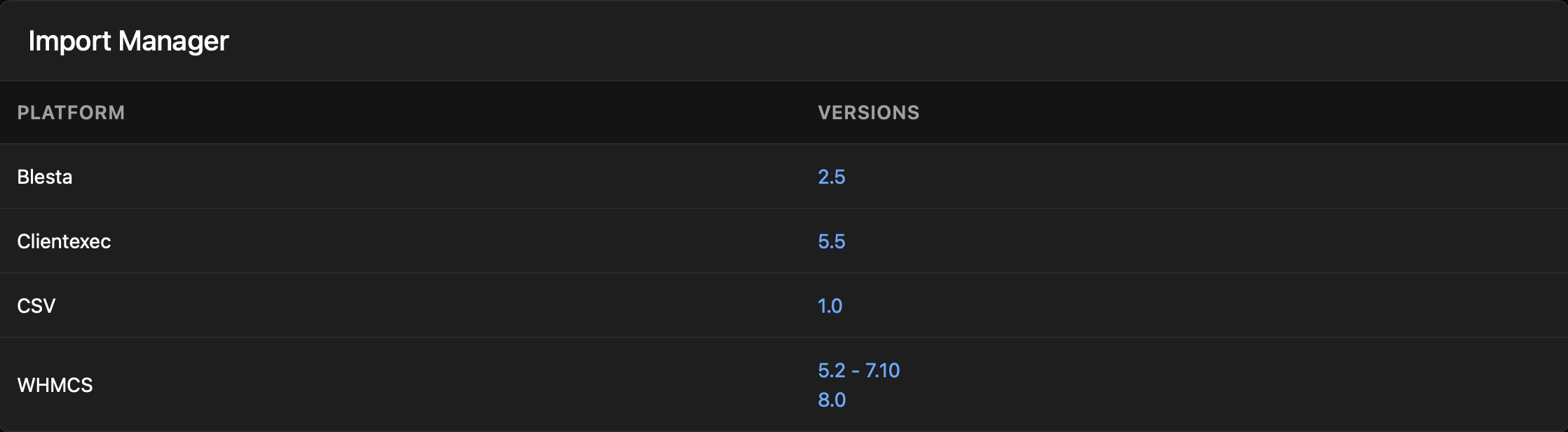
It is strongly recommended that you follow the Migration Guide to start and complete your import using this plugin. Migrations must run on a fresh Blesta installation. Backup your installation before proceeding so you can restore to do another import if necessary.
To import via cli navigate to the root directory of your Blesta installation and execute the following command
php index.php admin/plugin/import_manager/admin_manage_plugin/index
To import via cli navigate to the root directory of your Blesta installation and execute the following command to script the import using WHMCS v8+
php index.php admin/plugin/import_manager/admin_manage_plugin/index --type whmcs --version 8.0 --host DBHOST --database DBNAME --user DBUSER --pass DBPASS --key CCENCRYPTIONHASH --balance_credit y --enable_debug y
Replace
DBHOSTwith your database hostnameDBNAMEwith your database nameDBUSERwith your database userDBPASSwith your database passCCENCRYPTIONHASHwith your CC Encryption Hash- If you don't want to balance credits (recommended), change to 'n'.
- If you don't want to enable debug, change to 'n'
Use the -h switch to show all options:
php index.php admin/plugin/import_manager/admin_manage_plugin/index -h
Cleaning Up
After the import has completed successfully, you may safely uninstall the Import Manage plugin by clicking the "Uninstall" button for the plugin under [Settings] > [Company] > [Plugins] > Installed.